Showing posts with label makeup closet. Show all posts

Tuesday, July 8, 2014

My Makeup Collection || Part 2


Hi friendlies!!! So, yesterday I went over how to catalog your makeup, as well as a few tips on the program and uses for it. If you missed yesterday's post, let me catch you up!

My Makeup Collection (http://mymakeupcollection.com/)
is a new, free app that lets you catalog your makeup and document your looks, which is what we are going over today. Its super easy to use and terribly helpful (especially if you like to do e.l.f. hauls like I do!!!)

Here we go :D


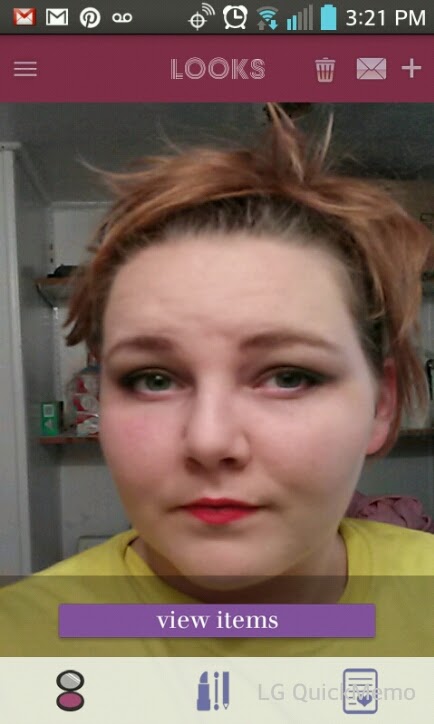
To create a look, click on the "+" symbol on the top right. Take a picture, or upload one from your phone. I suggest uploading as the in-app camera is a little wonky. 
After you have a picture uploaded, its now called a "look". When you are scrolling through the images, they will appear squat (like the image on the right). Don't worry, though, as everything clears up when you tap on it. See? (image on the left)

Once you have tapped on it, you can add items from your catalog that you used in this look. Tap on the "Add New Tag" banner.


That's all there is to it!!! The hard work will be in adding your entire collection to your new catalog, but it was worth the time for me. Plus, it has made shopping more fun ... especially online and magazine shopping.


So, even though the camera is a little goofy, the is a force to be reckoned with (plus one that already works). As always, if you have any questions, please don't be shy!


Monday, July 7, 2014

My Makeup Collection App || Part 1


Hi everyone! Today and tomorrow I will be doing a review of the new app "My Makeup Collection". There are two major parts to this free app: 1) documenting looks and 2) cataloging your makeup. This post will be about cataloging, since you have to be able to catalog to complete a look page.


The purpose of this app is to be able to have your entire makeup collection at the tip of your fingers, that way you aren't purchasing duplicates, items you hated, etc.

To start off with, you have to choose the category of makeup: eyeliner, foundation, lipstick, lip gloss, etc. There is also the option to create your own category.

Next, you can take a picture of the item (or a swatch and the item, like I did) and input the name and the brand. You also do a quick review of the item (just a simple 1-5 star rating with a quick description). 
One neat thing about this app is that there are different colored dots that you can use to further categorize your items. For instance, you could use the dark purple for items you never want to purchase again, neon purple for your favorite items, and light purple for items you want to send to friends.


Here is a screenie of three of the items I input. See the different colored dots on the far right of the name?


This is really handy when going to the store or browsing pintrest, too! You take a picture of an item you want and fill out the form like normal. Then, you tap "want it!", and that item is added to your wishlist! I like to use this when I go out pamper shopping ... that is, going out with x-amount of money to spend on just me. Instead of impulse buying, I can pull out my phone and see what it was I was really wanting to buy.


Have an admirer or a sister? The app allows you to share your wishlist to Facebook, Twitter, and through email. I am considering using this for my twitter for when new makeup items are featured in Glamour magazine ... then I can share my thoughts with all y'all :D


Wait, wait ... one more cool feature!
Okay. Here it is.
Ready?
Great :)

The app lets you post your reviews (with the ratings, the rant, and the swatches/photo) directly to you blog. All you have to do is allow it access on the blog. Bedazzle me if that's not a time saver!


Overall, its very easy to use. I would suggest taking your photos before you go to catalog it, though. For some reason, the images come up a little blurry if you take them in-app. I like that there are no restrictions on how many numerals I can put in a title or review. Of course, I also love that it's free ^.^


Come back tomorrow and find out how to document your looks!!!