Sunday, October 19, 2014

Nostalgia

Hi all! I have been taking a lot of time to revamp my blogs, including trying to find a new profile picture. As I was digging through my facebook images, I came across some that I wanted to share! It actually inspired me to create a numbers story ... so stay tuned for that!


Me at 18


My wedding day at 21


Me and my sister (18 and 15)


Me and my sister (21 and 18)


Wednesday, September 24, 2014

#BikiniReadyLifestyle

Hey everyone! So in my last post, I told you about the Bikini Ready energy gummies I got from Influenster. One of their requests is a post about my secrets to a bikini ready lifestyle. Let's do it!


Firstly, I don't wear bikinis BUT I do love to swim!


My secret to getting ready for swimming season:

1) Drink lots of water!

2) Take vitamins and minerals to keep your body healthy!

3) Take 3 tablespoons of coconut oil throughout the day. There are so many health benefits to coconut oil, its insane!

4) Stay active! I take a spinning class to get my heart rate up and to SWEAT! The key is to do something other than sit, though. Walk around the block, tighten and loosen the muscles of your body one at a time as you do dishes, things like that.

#BikiniReadyLifestyle

Monday, September 22, 2014

Vitality Vox Box


Hi everyone! I got another VoxBox in the mail from Influenster, and I thought I would share the contents, as well as my quick, initial review of the products. You like product reviews right? ... Right?!


Here is an overview of the box. I am pretty sure everything is in this picture ... Sometimes I get excited and start using things before I take my pics! Bad habit, I know :(


This is the informational card that comes in every box. It explains a little about the product, gives the retail prices, and also gives you a quick 1-2-3 guide at the top to remind you to participate in the badge challenges. I don't see these posted enough, so here ya go :)


This is my favorite product from this box, so I will start with it. (No, this isn't my picture.)
It is the softlips cube. 

First off, they gave me a $1/1 coupon, and I do love my coupons :)
Secondly, the formula works. It's smooth, no smell, a little bit of vanilla flavor... But it also keeps my lips moist or unchaps them. (Is that a word?)

The company info sheet says it's a 5-in-1 formula that is supposed to hydrate with Shea butter, replenish with vitamins A,C and E, smooth, protect with SPF 15, and shine. Yes, it does all that.

The cube packaging is nice to encounter after all the EOS eggs, not to say I don't like the egg shape. But. Change once in a while keeps us young.


This is my least favorite product. (Again, not my pic) I LOVE my sweet tea. They sent me an unsweetened tea ... So I just don't like it. Moving on to the facts, now.

There are zero calories in the unsweetened tea, also zero of everything else, including sugars. The ingredients are brewed tea and citric acid. Caffeine content is 30mg/8 fl oz. serving size is 8 fl oz and there are 2.5 servings. 

Oh! This is a Lipton product.

I would love to try the other flavors, but this unsweetened tea is one I avoid. No sugar, no go.


Moving on!


Here is a product I never would have tried on my own. It's the bikini ready energy gummies. In the sample pack, I was sent 2 gummies. This is a product that doesn't make any sense to me ...

In the ingredients, there is coloring, flavoring, acids ... but it doesn't mention vitamins or anything like that. Plus, they don't really taste that good, once you get past the sugar. 

I didn't notice a change in energy. I won't invest in these. Next product.


First aid kit material! Yes!
Unfortunately, I don't burn myself (except for my tongue). Thus, I haven't had to use this.

Its supposed to help heal minor burns, rawness, and stop itching.

And finally ...


My second favorite product! (Since you should always end on a positive note)

This is the Elizabeth Arden flawless future serum.

There wasn't much in the way of instruction, but it did explain what the formula is supposed to do. It is supposed to even skin tone and reduce the look of wrinkles, among other thing. The evening of skin tone is what I'm hoping it will do for me!

Cons: There is an odd smell to it, but it isn't terribly strong.

Pros: It acts like a primer.
It has helped keep my morning oil down.
3 pumps on the sample covered my entire face.


That's all, folks! If you have more questions, want to contest me, etc., leave a comment below! Have a great day ^.^


Wednesday, July 9, 2014

An Overview of the My Makeup Collection App

General

I use the My Makeup Collection app almost everyday. I used to walk through the shops and end up spending more than I meant to all the time, when I already had similar products at home. The wishlist is also handy for my husband (who never really knows what to get me for gifts) – now I get products I actually wanted. 
It’s also really good to show how much I am using which products in looks. I can click to tag the products and then check how many looks use the product. It helps me see what products are the most versatile, which is terribly handy.


App Customization

When you are using the My Makeup Collection app, it can be useful to customize it to make sure you are getting the most out it. Firstly, you can add any of your favorite brands by going into the brand view in the top left corner, then clicking on a “Add a New Brand”. You can also Add New product types to include new products you try or other useful tools you use. 


Why to use a makeup tracking app


Most women find that they have makeup that they don’t use or have stashed away somewhere from an impulse purchase. Researchers think that women don’t use up to 70% of the makeup that they purchase.  Lots of the time the makeup we buy is so similar to items we have at home its effectively a dupe. By keeping a track of the items you want, and what you have already you can prioritise purchases and get the makeup you really want. 

Tuesday, July 8, 2014

My Makeup Collection || Part 2


Hi friendlies!!! So, yesterday I went over how to catalog your makeup, as well as a few tips on the program and uses for it. If you missed yesterday's post, let me catch you up!

My Makeup Collection (http://mymakeupcollection.com/)
is a new, free app that lets you catalog your makeup and document your looks, which is what we are going over today. Its super easy to use and terribly helpful (especially if you like to do e.l.f. hauls like I do!!!)

Here we go :D


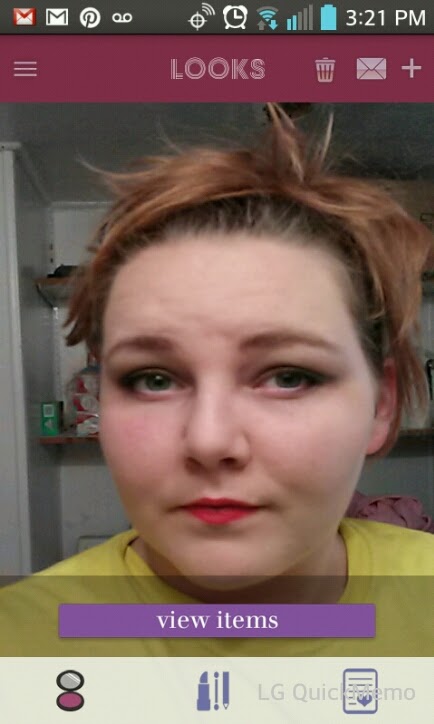
To create a look, click on the "+" symbol on the top right. Take a picture, or upload one from your phone. I suggest uploading as the in-app camera is a little wonky. 
After you have a picture uploaded, its now called a "look". When you are scrolling through the images, they will appear squat (like the image on the right). Don't worry, though, as everything clears up when you tap on it. See? (image on the left)

Once you have tapped on it, you can add items from your catalog that you used in this look. Tap on the "Add New Tag" banner.


That's all there is to it!!! The hard work will be in adding your entire collection to your new catalog, but it was worth the time for me. Plus, it has made shopping more fun ... especially online and magazine shopping.


So, even though the camera is a little goofy, the is a force to be reckoned with (plus one that already works). As always, if you have any questions, please don't be shy!


Monday, July 7, 2014

My Makeup Collection App || Part 1


Hi everyone! Today and tomorrow I will be doing a review of the new app "My Makeup Collection". There are two major parts to this free app: 1) documenting looks and 2) cataloging your makeup. This post will be about cataloging, since you have to be able to catalog to complete a look page.


The purpose of this app is to be able to have your entire makeup collection at the tip of your fingers, that way you aren't purchasing duplicates, items you hated, etc.

To start off with, you have to choose the category of makeup: eyeliner, foundation, lipstick, lip gloss, etc. There is also the option to create your own category.

Next, you can take a picture of the item (or a swatch and the item, like I did) and input the name and the brand. You also do a quick review of the item (just a simple 1-5 star rating with a quick description). 
One neat thing about this app is that there are different colored dots that you can use to further categorize your items. For instance, you could use the dark purple for items you never want to purchase again, neon purple for your favorite items, and light purple for items you want to send to friends.


Here is a screenie of three of the items I input. See the different colored dots on the far right of the name?


This is really handy when going to the store or browsing pintrest, too! You take a picture of an item you want and fill out the form like normal. Then, you tap "want it!", and that item is added to your wishlist! I like to use this when I go out pamper shopping ... that is, going out with x-amount of money to spend on just me. Instead of impulse buying, I can pull out my phone and see what it was I was really wanting to buy.


Have an admirer or a sister? The app allows you to share your wishlist to Facebook, Twitter, and through email. I am considering using this for my twitter for when new makeup items are featured in Glamour magazine ... then I can share my thoughts with all y'all :D


Wait, wait ... one more cool feature!
Okay. Here it is.
Ready?
Great :)

The app lets you post your reviews (with the ratings, the rant, and the swatches/photo) directly to you blog. All you have to do is allow it access on the blog. Bedazzle me if that's not a time saver!


Overall, its very easy to use. I would suggest taking your photos before you go to catalog it, though. For some reason, the images come up a little blurry if you take them in-app. I like that there are no restrictions on how many numerals I can put in a title or review. Of course, I also love that it's free ^.^


Come back tomorrow and find out how to document your looks!!!